Spectrum Filter
Downloads for 2 Proteome Discoverer versions
Proteome Discoverer 1.4
SHA-256
bc01d9c9f010bca33501166513e0e2c008647e06dbfd2358cee09ab8dc4fbfd6Checksums and download command
| SHA-256 | bc01d9c9f010bca33501166513e0e2c008647e06dbfd2358cee09ab8dc4fbfd6 |
|---|---|
| MD5 | 3717e0e4e73e29da1f764aaa19996eb0 |
Downloads the file and checks its SHA-256; a click selects a whole checksum or command.
$ProgressPreference = 'SilentlyContinue'; $f = 'spectrumfilter_1.4.zip'; Invoke-WebRequest -Uri 'https://ms.imp.ac.at/data/spectrum-filter/spectrumfilter_1.4.zip' -OutFile $f; if ((Get-FileHash $f -Algorithm SHA256).Hash -eq 'bc01d9c9f010bca33501166513e0e2c008647e06dbfd2358cee09ab8dc4fbfd6') { "OK: $f" } else { Remove-Item $f; Write-Error 'Checksum mismatch, file deleted' }curl -fL -o 'spectrumfilter_1.4.zip' 'https://ms.imp.ac.at/data/spectrum-filter/spectrumfilter_1.4.zip' && echo 'bc01d9c9f010bca33501166513e0e2c008647e06dbfd2358cee09ab8dc4fbfd6 spectrumfilter_1.4.zip' | sha256sum -c -curl -fL -o 'spectrumfilter_1.4.zip' 'https://ms.imp.ac.at/data/spectrum-filter/spectrumfilter_1.4.zip' && echo 'bc01d9c9f010bca33501166513e0e2c008647e06dbfd2358cee09ab8dc4fbfd6 spectrumfilter_1.4.zip' | shasum -a 256 -c -Proteome Discoverer 1.3
SHA-256
c83aad9561559d52d8bad3a7c8171560b4f9c10d2c5909a402c55f0888326884Checksums and download command
| SHA-256 | c83aad9561559d52d8bad3a7c8171560b4f9c10d2c5909a402c55f0888326884 |
|---|---|
| MD5 | e73892bb7f187d8c95358215ae3c33df |
Downloads the file and checks its SHA-256; a click selects a whole checksum or command.
$ProgressPreference = 'SilentlyContinue'; $f = 'spectrumfilter_1.3.zip'; Invoke-WebRequest -Uri 'https://ms.imp.ac.at/data/spectrum-filter/spectrumfilter_1.3.zip' -OutFile $f; if ((Get-FileHash $f -Algorithm SHA256).Hash -eq 'c83aad9561559d52d8bad3a7c8171560b4f9c10d2c5909a402c55f0888326884') { "OK: $f" } else { Remove-Item $f; Write-Error 'Checksum mismatch, file deleted' }curl -fL -o 'spectrumfilter_1.3.zip' 'https://ms.imp.ac.at/data/spectrum-filter/spectrumfilter_1.3.zip' && echo 'c83aad9561559d52d8bad3a7c8171560b4f9c10d2c5909a402c55f0888326884 spectrumfilter_1.3.zip' | sha256sum -c -curl -fL -o 'spectrumfilter_1.3.zip' 'https://ms.imp.ac.at/data/spectrum-filter/spectrumfilter_1.3.zip' && echo 'c83aad9561559d52d8bad3a7c8171560b4f9c10d2c5909a402c55f0888326884 spectrumfilter_1.3.zip' | shasum -a 256 -c -Not supported: Proteome Discoverer 2.0, 2.1, 2.2, 2.3, 2.4, 2.5, 3.0, 3.1, 3.2, 3.3.
Download and Installation
- Save all your files and shutdown Thermo Scientific Proteome Discoverer.
- Download the node’s DLL (for PD 1.3.x or PD 1.4.x)
- Copy the downloaded DLLs to the Proteome Discoverer Release folder, e.g.: "C:\Program Files\Thermo\Discoverer Demo 1.3\System\Release".
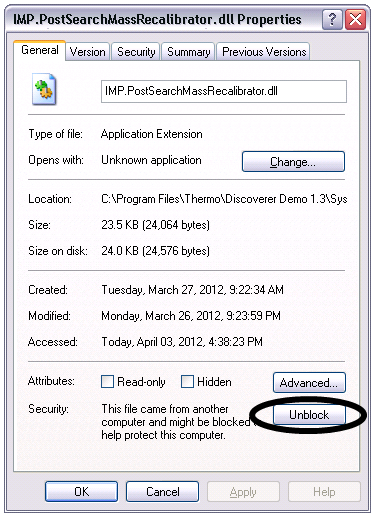
- For each DLL: Right-click the DLL, open its properties window and click the Unblock botton, if available.
- Open a command prompt and navigate to the Proteome Discoverer Release folder.
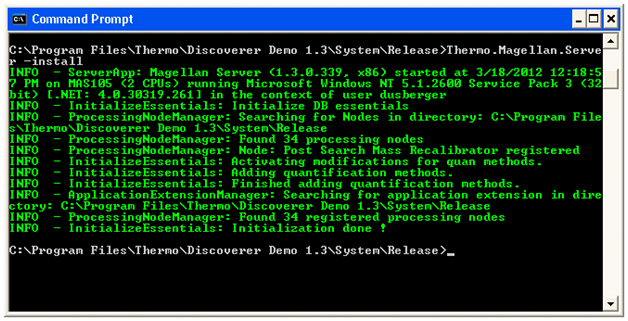
- Enter “Thermo.Magellan.Server –install” (without the quotes).
- You should see the message, indicating that the installation worked sucessfully: "INFO - ProcessingNodeManager: Node: Post Search Mass Recalibrator registered"
Functionality
We are sorry, at the moment there's no description available.