IMP Hyperplex
Downloads for 6 Proteome Discoverer versions
09c1ab4cac2591aec0cfa93ecd52fda4e76d5e39018bb4809239c194798e905aChecksums and download command
| SHA-256 | 09c1ab4cac2591aec0cfa93ecd52fda4e76d5e39018bb4809239c194798e905a |
|---|---|
| MD5 | 7d41f1b0e00b6b5af4df5ba8a7ccf873 |
Downloads the file and checks its SHA-256; a click selects a whole checksum or command.
$ProgressPreference = 'SilentlyContinue'; $f = 'impHyperplex_PD3.0.zip'; Invoke-WebRequest -Uri 'https://ms.imp.ac.at/data/hyperplex/impHyperplex_PD3.0.zip' -OutFile $f; if ((Get-FileHash $f -Algorithm SHA256).Hash -eq '09c1ab4cac2591aec0cfa93ecd52fda4e76d5e39018bb4809239c194798e905a') { "OK: $f" } else { Remove-Item $f; Write-Error 'Checksum mismatch, file deleted' }curl -fL -o 'impHyperplex_PD3.0.zip' 'https://ms.imp.ac.at/data/hyperplex/impHyperplex_PD3.0.zip' && echo '09c1ab4cac2591aec0cfa93ecd52fda4e76d5e39018bb4809239c194798e905a impHyperplex_PD3.0.zip' | sha256sum -c -curl -fL -o 'impHyperplex_PD3.0.zip' 'https://ms.imp.ac.at/data/hyperplex/impHyperplex_PD3.0.zip' && echo '09c1ab4cac2591aec0cfa93ecd52fda4e76d5e39018bb4809239c194798e905a impHyperplex_PD3.0.zip' | shasum -a 256 -c -88877c23a92ba3b1d5b944ec16fe6dd129c86c88fb945720c34a4e149de12e3eChecksums and download command
| SHA-256 | 88877c23a92ba3b1d5b944ec16fe6dd129c86c88fb945720c34a4e149de12e3e |
|---|---|
| MD5 | af8dd9a4387186a4e752749a4116d352 |
Downloads the file and checks its SHA-256; a click selects a whole checksum or command.
$ProgressPreference = 'SilentlyContinue'; $f = 'impHyperplex_PD2.5.zip'; Invoke-WebRequest -Uri 'https://ms.imp.ac.at/data/hyperplex/impHyperplex_PD2.5.zip' -OutFile $f; if ((Get-FileHash $f -Algorithm SHA256).Hash -eq '88877c23a92ba3b1d5b944ec16fe6dd129c86c88fb945720c34a4e149de12e3e') { "OK: $f" } else { Remove-Item $f; Write-Error 'Checksum mismatch, file deleted' }curl -fL -o 'impHyperplex_PD2.5.zip' 'https://ms.imp.ac.at/data/hyperplex/impHyperplex_PD2.5.zip' && echo '88877c23a92ba3b1d5b944ec16fe6dd129c86c88fb945720c34a4e149de12e3e impHyperplex_PD2.5.zip' | sha256sum -c -curl -fL -o 'impHyperplex_PD2.5.zip' 'https://ms.imp.ac.at/data/hyperplex/impHyperplex_PD2.5.zip' && echo '88877c23a92ba3b1d5b944ec16fe6dd129c86c88fb945720c34a4e149de12e3e impHyperplex_PD2.5.zip' | shasum -a 256 -c -817b07db2e69c0f26807b898687fa82d83ecdadf4839ea6c1ef10361e1d156fbChecksums and download command
| SHA-256 | 817b07db2e69c0f26807b898687fa82d83ecdadf4839ea6c1ef10361e1d156fb |
|---|---|
| MD5 | 748816fc3564d23128dc9c2add708dd2 |
Downloads the file and checks its SHA-256; a click selects a whole checksum or command.
$ProgressPreference = 'SilentlyContinue'; $f = 'impHyperplex_PD2.4.zip'; Invoke-WebRequest -Uri 'https://ms.imp.ac.at/data/hyperplex/impHyperplex_PD2.4.zip' -OutFile $f; if ((Get-FileHash $f -Algorithm SHA256).Hash -eq '817b07db2e69c0f26807b898687fa82d83ecdadf4839ea6c1ef10361e1d156fb') { "OK: $f" } else { Remove-Item $f; Write-Error 'Checksum mismatch, file deleted' }curl -fL -o 'impHyperplex_PD2.4.zip' 'https://ms.imp.ac.at/data/hyperplex/impHyperplex_PD2.4.zip' && echo '817b07db2e69c0f26807b898687fa82d83ecdadf4839ea6c1ef10361e1d156fb impHyperplex_PD2.4.zip' | sha256sum -c -curl -fL -o 'impHyperplex_PD2.4.zip' 'https://ms.imp.ac.at/data/hyperplex/impHyperplex_PD2.4.zip' && echo '817b07db2e69c0f26807b898687fa82d83ecdadf4839ea6c1ef10361e1d156fb impHyperplex_PD2.4.zip' | shasum -a 256 -c -c7ba879482ff2e0d47a4f3e3aa78f8c978037670975d91ac95d5554939b65caeChecksums and download command
| SHA-256 | c7ba879482ff2e0d47a4f3e3aa78f8c978037670975d91ac95d5554939b65cae |
|---|---|
| MD5 | 70181928781725c83e209b51661c1406 |
Downloads the file and checks its SHA-256; a click selects a whole checksum or command.
$ProgressPreference = 'SilentlyContinue'; $f = 'impHyperplex_PD2.3.zip'; Invoke-WebRequest -Uri 'https://ms.imp.ac.at/data/hyperplex/impHyperplex_PD2.3.zip' -OutFile $f; if ((Get-FileHash $f -Algorithm SHA256).Hash -eq 'c7ba879482ff2e0d47a4f3e3aa78f8c978037670975d91ac95d5554939b65cae') { "OK: $f" } else { Remove-Item $f; Write-Error 'Checksum mismatch, file deleted' }curl -fL -o 'impHyperplex_PD2.3.zip' 'https://ms.imp.ac.at/data/hyperplex/impHyperplex_PD2.3.zip' && echo 'c7ba879482ff2e0d47a4f3e3aa78f8c978037670975d91ac95d5554939b65cae impHyperplex_PD2.3.zip' | sha256sum -c -curl -fL -o 'impHyperplex_PD2.3.zip' 'https://ms.imp.ac.at/data/hyperplex/impHyperplex_PD2.3.zip' && echo 'c7ba879482ff2e0d47a4f3e3aa78f8c978037670975d91ac95d5554939b65cae impHyperplex_PD2.3.zip' | shasum -a 256 -c -491e8f75c7d9e09eaf5ff675054711460e20bedc3ddb3e96a699df02dd3e6b37Checksums and download command
| SHA-256 | 491e8f75c7d9e09eaf5ff675054711460e20bedc3ddb3e96a699df02dd3e6b37 |
|---|---|
| MD5 | 97fb52e5c5e6cde1e731d3b8c1d5bac9 |
Downloads the file and checks its SHA-256; a click selects a whole checksum or command.
$ProgressPreference = 'SilentlyContinue'; $f = 'impHyperplex_PD2.1.zip'; Invoke-WebRequest -Uri 'https://ms.imp.ac.at/data/hyperplex/impHyperplex_PD2.1.zip' -OutFile $f; if ((Get-FileHash $f -Algorithm SHA256).Hash -eq '491e8f75c7d9e09eaf5ff675054711460e20bedc3ddb3e96a699df02dd3e6b37') { "OK: $f" } else { Remove-Item $f; Write-Error 'Checksum mismatch, file deleted' }curl -fL -o 'impHyperplex_PD2.1.zip' 'https://ms.imp.ac.at/data/hyperplex/impHyperplex_PD2.1.zip' && echo '491e8f75c7d9e09eaf5ff675054711460e20bedc3ddb3e96a699df02dd3e6b37 impHyperplex_PD2.1.zip' | sha256sum -c -curl -fL -o 'impHyperplex_PD2.1.zip' 'https://ms.imp.ac.at/data/hyperplex/impHyperplex_PD2.1.zip' && echo '491e8f75c7d9e09eaf5ff675054711460e20bedc3ddb3e96a699df02dd3e6b37 impHyperplex_PD2.1.zip' | shasum -a 256 -c -22b1d5037839fa82c9d595bda05ced405437a5603bc598695d36f20536e82a3dChecksums and download command
| SHA-256 | 22b1d5037839fa82c9d595bda05ced405437a5603bc598695d36f20536e82a3d |
|---|---|
| MD5 | 40def43688a67147b0dfcfa9cfbbc47e |
Downloads the file and checks its SHA-256; a click selects a whole checksum or command.
$ProgressPreference = 'SilentlyContinue'; $f = 'impHyperplex_PD1.4.zip'; Invoke-WebRequest -Uri 'https://ms.imp.ac.at/data/hyperplex/impHyperplex_PD1.4.zip' -OutFile $f; if ((Get-FileHash $f -Algorithm SHA256).Hash -eq '22b1d5037839fa82c9d595bda05ced405437a5603bc598695d36f20536e82a3d') { "OK: $f" } else { Remove-Item $f; Write-Error 'Checksum mismatch, file deleted' }curl -fL -o 'impHyperplex_PD1.4.zip' 'https://ms.imp.ac.at/data/hyperplex/impHyperplex_PD1.4.zip' && echo '22b1d5037839fa82c9d595bda05ced405437a5603bc598695d36f20536e82a3d impHyperplex_PD1.4.zip' | sha256sum -c -curl -fL -o 'impHyperplex_PD1.4.zip' 'https://ms.imp.ac.at/data/hyperplex/impHyperplex_PD1.4.zip' && echo '22b1d5037839fa82c9d595bda05ced405437a5603bc598695d36f20536e82a3d impHyperplex_PD1.4.zip' | shasum -a 256 -c -Not supported: Proteome Discoverer 1.3, 2.0, 2.2, 3.1, 3.2, 3.3.
Features
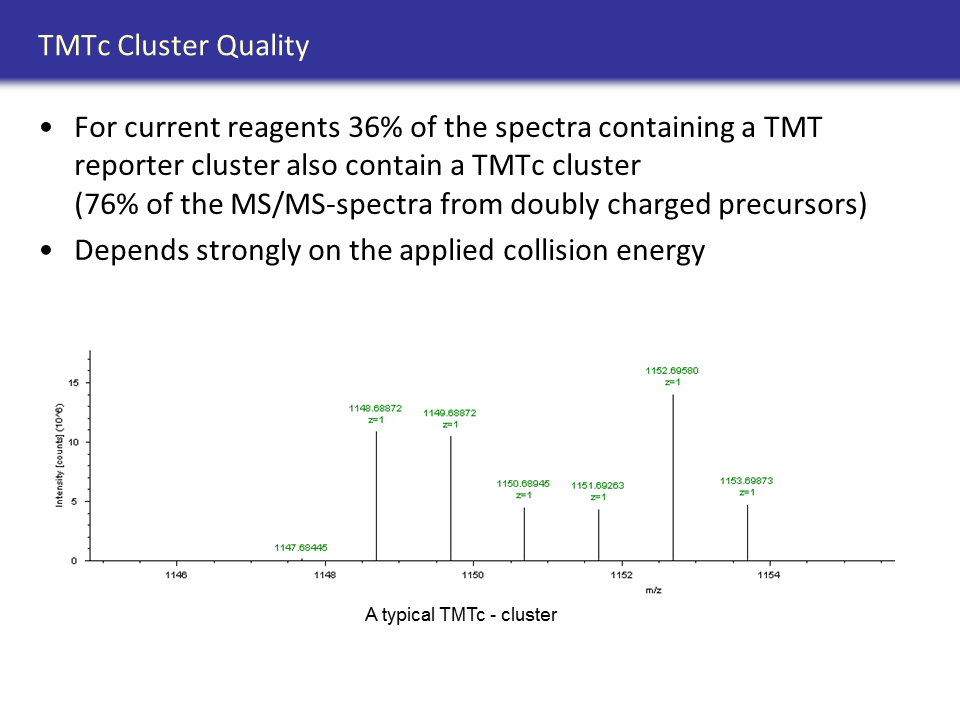
This software has been developed to be used with the Thermo Scientific Proteome Discoverer software, version 1.4.x, 2.1.x, 2.3.x, 2.4.x, 2.5.x and 3.0.x. It adds a new node that can be incorporated into the workflow.
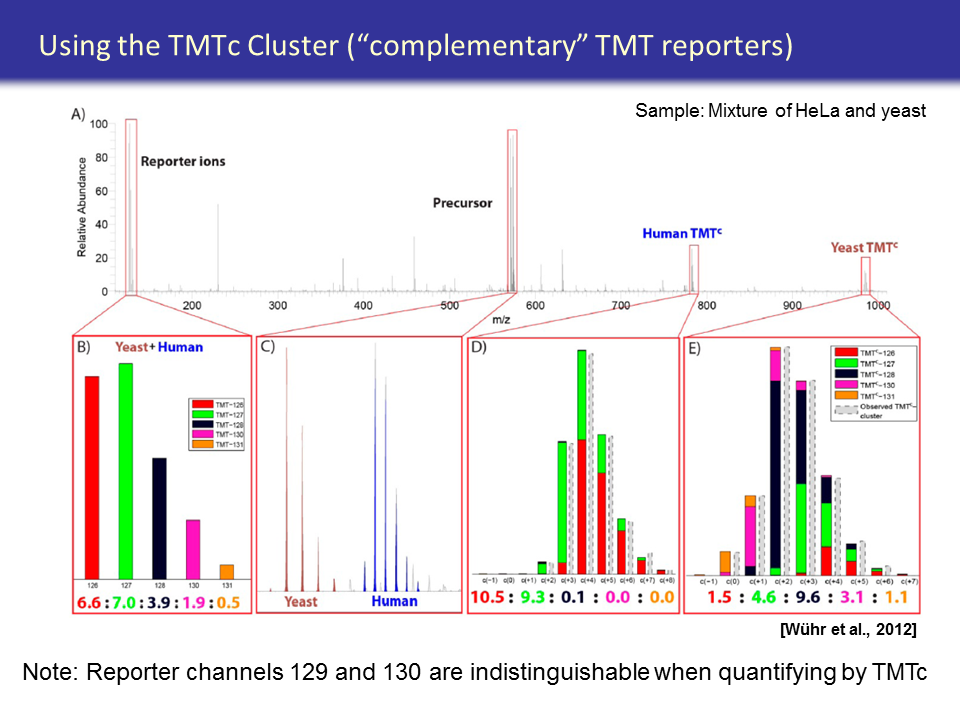
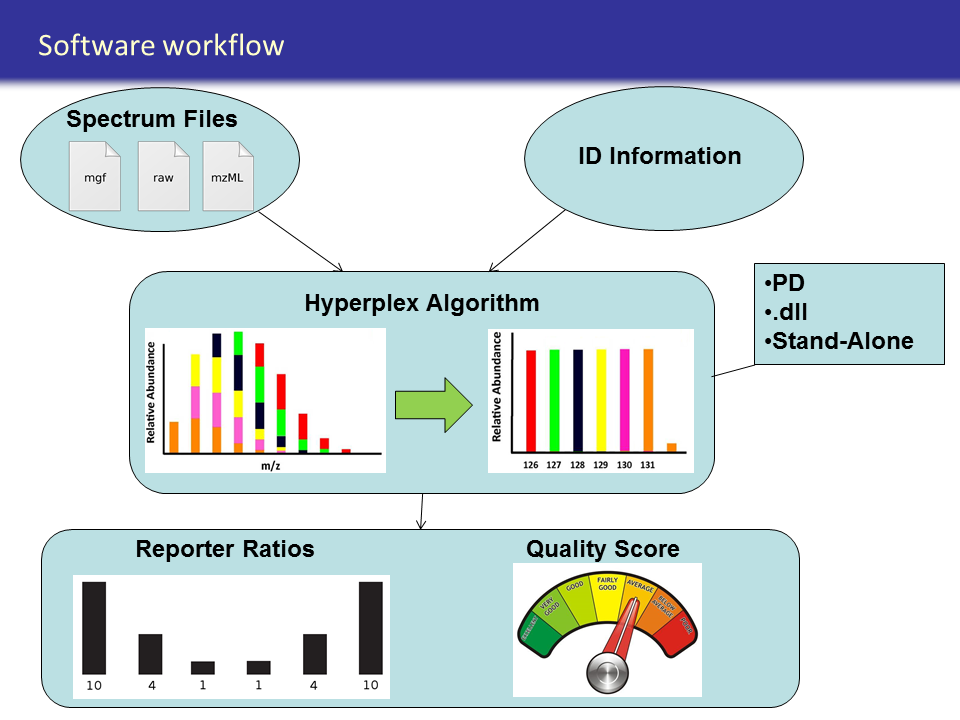
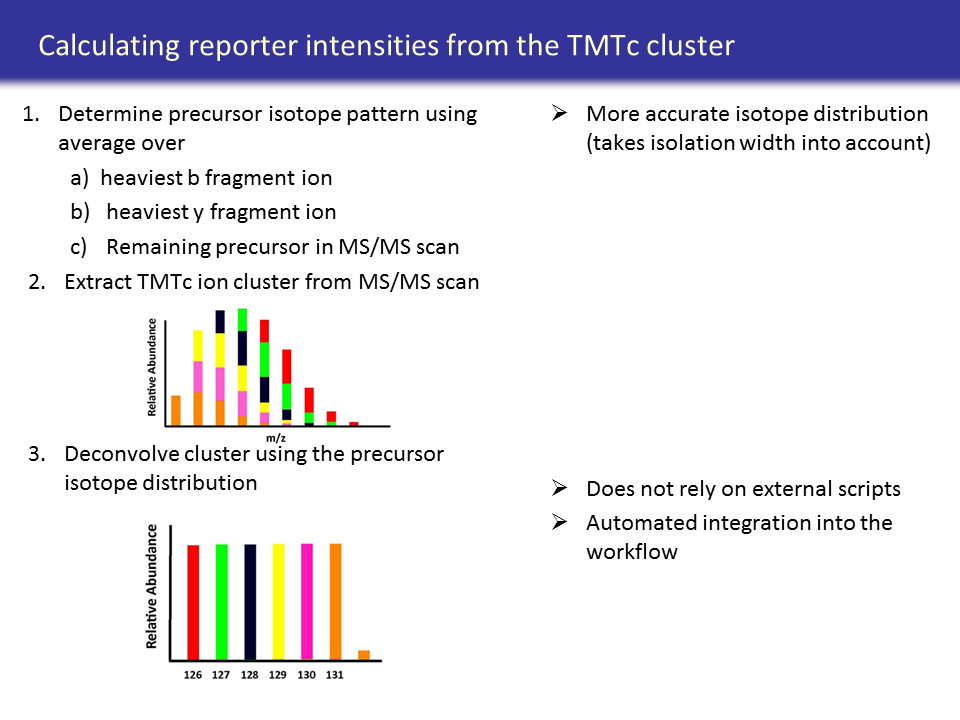
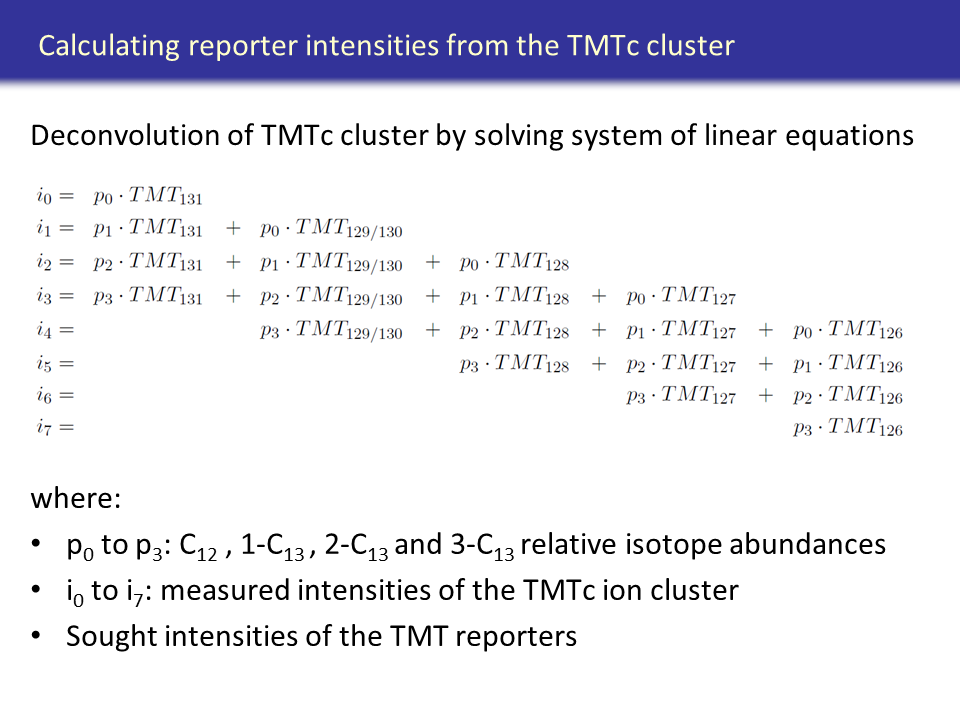
Usage
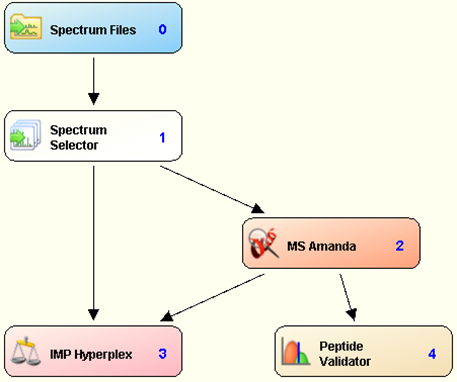
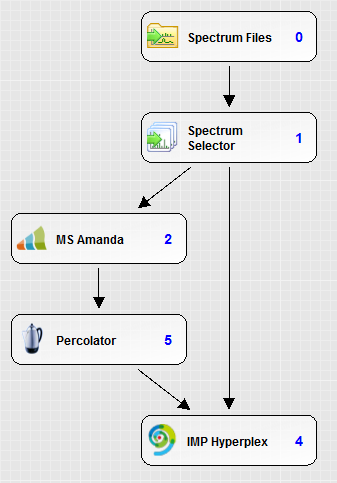
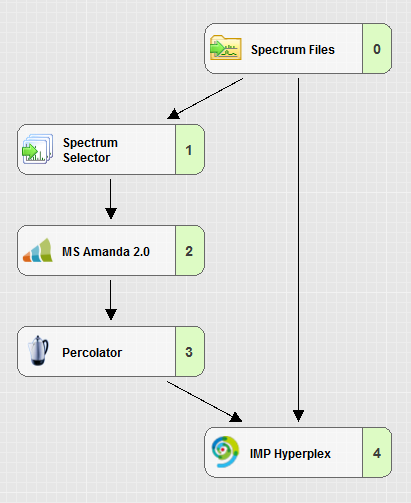
Simply include the node into a workflow.
How to use
The instructions on how to use it and how it should be installed can be found in the downloaded zip file and here.Download and installation
- Download the node’s DLLs (PD 1.4.x, PD 2.1.x, PD 2.3.x, PD 2.4.x, PD 2.5.x or PD 3.0.x) and carefully read the attached license agreement. Proceed only if you agree to the terms and conditions of the license.
- Save all your files and shutdown Thermo Scientific Proteome Discoverer.
- Copy the downloaded DLLs to the Proteome Discoverer Release folder, e.g.: "C:\Program Files\Thermo\Proteome Discoverer 2.3\System\Release".
- Right-click all DLLs, open its properties window and click the Unblock button if available.
- Unblocking the DLL file
- Open a command prompt and navigate to the Proteome Discoverer Release folder.
- Enter “Thermo.Magellan.Server –install” (without the quotes).
- You should see a message, indicating that the installation worked sucessfully.